The config is the screenshot.
This is the actual config format — a real F# program in ~/.config/wtf/config.fsx, checked by a real compiler.
// ~/.config/wtf/config.fsx — this is the actual config format
let wtfConfig =
    config {
        modKey "Super"
        terminal "foot"
        defaultLayout Layouts.Tall        // Type Provider: a typo won't compile
        keys (keymap {
            bind "M-Return" (Spawn "foot")
            bind "M-j"      (Focus NextWindow)
            bind "M-space"  (SetLayout Layouts.Bsp)
        })
        manageHook (manage {
            rule (appIs "firefox") (ShiftToWorkspace "2")
            rule (titleContains "Picture-in-Picture") FloatWindow
        })
        gaps 8
        cornerRadius 10
        blur true
        shadow true                       // macOS-style drop shadows (scenefx)
        wallpaper (Dynamic ("~/pics/catalina.heic", Fill))  // time-of-day .heic
    }
Save the file and the running WM applies it instantly. A typo? The config is rejected, the error goes to the log, and the last good config stays active — your session never dies from a missing parenthesis. In an editor with the F# LSP (wtf-edit sets it up), Apps. autocompletes to your installed applications and Layouts. to the valid layouts — a rule for an app you don't have is a compile error, not a broken session.
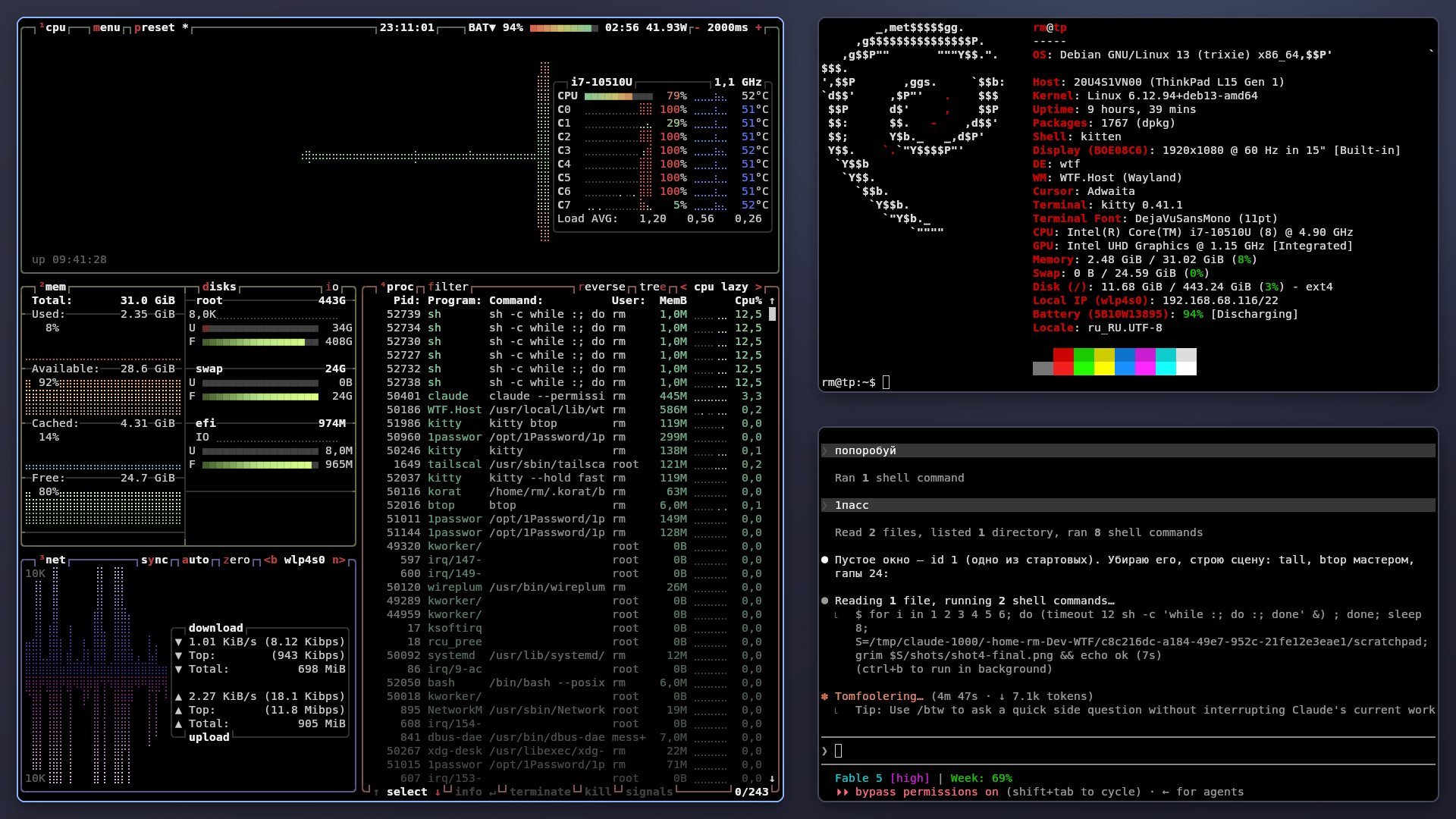
A real capture from the author's daily-driver session — the agent in the bottom-right window is developing WTF from inside WTF. More captures (hot-reload GIF, wtfctl ask) coming.
Why WTF
Five properties no other compositor combines.
λA compiler behind your config
Machine-aware Type Providers turn your machine into types: Apps.Firefox.AppId, Layouts.Bsp. SetLayout "tll" or a rule for an app you don't have is a compile error in your editor — not a black screen at login. And because config is code, appearance can be a function: per-app borders, generated keymaps, themes.
↻Hot-reload with a safety net
Every save recompiles and applies the config live, off the main thread. A config that doesn't compile is rejected — the last good one stays active and the error lands in the log. The session never stutters or dies from an edit.
⌁Agent-first control socket
The whole WM state is one JSON document; every action is a semantic command on an NDJSON unix socket. Scripts, socat, or an LLM — same door.
$ wtfctl tools   # tool manifest for LLM agents
$ wtfctl ask "put the browser on workspace 2 and focus it"
$ wtfctl '{"cmd":"focus","app":"firefox"}'
✦Eye-candy, live-tunable
Backdrop blur, rounded corners, macOS-style drop shadows (scenefx), slide/fade animations, per-window opacity — and dynamic time-of-day .heic wallpapers, the macOS format, decoded with libheif. Every knob works over the socket, so you rice live and bake the result into config.
$ wtfctl corners 12
$ wtfctl blur on
☂Crashes handled honestly
The login manager runs a session wrapper, not the raw compositor: on an abnormal exit it restarts WTF (bounded), falls back to safe mode (default config, no eye-candy), then returns you to the greeter. Every session writes a complete log with backtraces to ~/.local/state/wtf/.
✓Tested like a library
The window-management brain is pure F# — 786 xUnit/FsCheck tests green. On every commit, CI builds, installs, and boots the real compositor headless on five distros and drives it over IPC. Also in the box: workspaces 1–9, five layouts plus custom F# ones, XWayland, portals, undo/redo.
Honest status. Dogfooded daily as the author's main session. Single monitor is the well-trodden path today — multi-monitor tiling is the top roadmap item. Expect rough edges; the crash story above is how they're handled. debianubuntu 24.04fedoraarchopensuse
How it compares
These are all good projects; WTF exists because no one of them combines these particular properties.
| WTF | xMonad | sway | Hyprland | |
|---|---|---|---|---|
| config | F# code — compile-checked, autocompleted, hot-reload with last-good fallback | Haskell code, recompile to apply | text file (i3 syntax) | text file (+ plugins) |
| eye-candy | blur, corners, shadows, animations (scenefx) | none built in | none by design | the reference point |
| scripting | NDJSON socket, semantic commands, LLM tool manifest | X11 tools / custom | swaymsg IPC | hyprctl IPC |
| multi-monitor | not yet (top roadmap item) | yes | yes, mature | yes, mature |
| maturity | 0.1 beta | decades | very mature | mature, huge community |
If you need multi-monitor today, or maximum stability, sway and Hyprland are the safer choices — genuinely. If you want your WM to be a typed program with an agent-grade API, that's the niche WTF is built for.
Try it in 60 seconds — without logging out.
You don't have to trust WTF with your session. Run wtf from a terminal inside your current desktop and it opens as a regular window with a full compositor running in it. Close the window when you're done — nothing outside it is touched.
$ curl -fsSL https://raw.githubusercontent.com/Neftedollar/WTF/master/scripts/get-wtf.sh | bash
$ wtf            # nested session in a window — play with Super+Return, Super+j/k
$ wtfctl state   # in another terminal: the whole WM state as JSON
Convinced? Log out and pick WTF in your display manager (GDM/SDDM). First steps: Quickstart.