✦ .NET Global Tool
Ship with a
full AI team
One command scaffolds an autonomous multi-agent AI coding workspace. Orchestrator picks roles, runs the pipeline, delivers PRs. You set direction.
One command scaffolds an autonomous multi-agent AI coding workspace. Orchestrator picks roles, runs the pipeline, delivers PRs. You set direction.
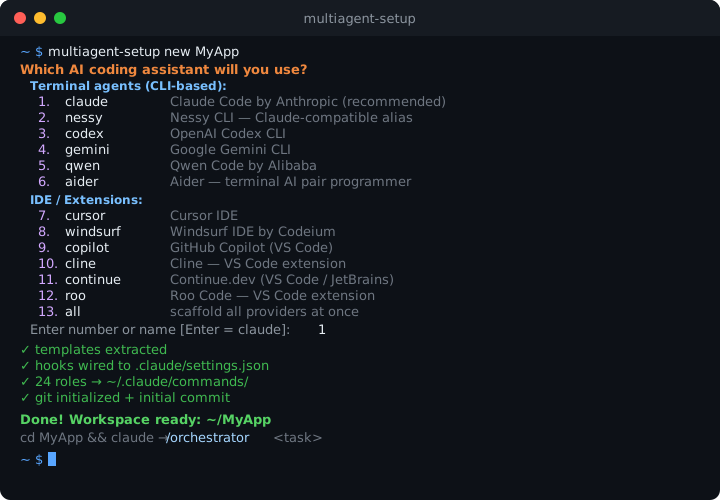
From install to first autonomous PR in minutes. No YAML, no plumbing, no boilerplate.
Orchestrator breaks tasks into steps, assigns specialist roles,
and gates each stage on
APPROVED /
NEEDS WORK. Humans
steer direction only.
Claude, Gemini, Codex, Qwen, Cursor, Windsurf, Copilot, Nessy,
Cline, Aider, Continue, Roo Code, Kiro — one command each, or
--provider all to
scaffold every provider at once.
Block rm -rf /, enforce
conventional commits, auto-lint on save — built-in,
cross-platform, zero config.
AGE graph + O'Brien semantic memory: agents share context and accumulate project knowledge across sessions.
30+ specialist roles from agency-agents, installed to
project-local
.claude/commands/ —
always current.
Logic lives in the .NET binary.
.csx wrappers are the
only scripts. Works on macOS, Linux, and Windows.
Install the tool, scaffold a workspace, tell the Orchestrator what to build.
Each provider gets its own scaffold: config files, hooks, role commands — all wired up.
5 pipeline types: feature, bugfix (skip PLAN), infra, content, spike (PLAN only). Each step gates on APPROVED / NEEDS WORK. Auto-retry 3× → helper agent → CEO escalation.
On macOS and Linux you can install via Homebrew — no .NET SDK
required:
brew install
                Neftedollar/multiagent-template/multiagent-setup
. The dotnet global tool route (dotnet tool install -g multiagent-setup) requires .NET 10 SDK. A bootstrap script is also available that
installs all prerequisites automatically.
13 providers: Claude Code, Gemini CLI, Codex, Qwen, Cursor,
Windsurf, GitHub Copilot, Cline, Aider, Continue.dev, Roo Code,
Nessy, and Amazon Kiro. Use
--provider all to
scaffold every provider at once, or add providers later with
multiagent-setup add-provider <name>.
Yes. Use
multiagent-setup init
inside any existing git repository. It adds workspace files
(CLAUDE.md, docs/, .claude/, hooks) without touching your code or
creating a new directory.
Yes — MIT license, free for commercial and personal use. Source code is on GitHub.
The orchestrator reads
docs/role-capabilities.md
— a capability index generated during workspace setup — and
selects roles dynamically. It never hardcodes assignments. If no
existing role fits a task it can create an ad-hoc role on the fly.


