Orleans Dashboard
Section titled “Orleans Dashboard”Use Microsoft’s Orleans Dashboard package with functional F# actors. The repository contains a runnable ASP.NET Core silo with CounterActor and CartActor.
Install
Section titled “Install”dotnet add package Microsoft.Orleans.DashboardKeep the Dashboard package on the same Orleans version selected by the application. Orleans Dashboard is a preview feature in Orleans 10, so re-run the smoke check when updating Orleans even inside the supported range.
Configure the silo
Section titled “Configure the silo”open Orleans.FSharp.Runtime
let config = siloConfig { useLocalhostClustering addMemoryStorage "Default" addDashboardWithOptions 1000 // counter update interval in milliseconds (minimum 1000) 100 // retained history points false // keep the live trace endpoint visible }addDashboard uses package defaults. addDashboardWithOptions configures CounterUpdateIntervalMs, HistoryLength, and HideTrace without taking a compile-time dependency from Orleans.FSharp.Runtime on the optional Dashboard package.
Register functional definitions as usual:
builder.UseOrleans(fun siloBuilder -> SiloConfig.applyToSiloBuilder config siloBuilder siloBuilder.AddFunctionalGrain(counterDefinition) |> ignore siloBuilder.AddFunctionalGrain(cartDefinition) |> ignore)|> ignoreMap the web endpoint
Section titled “Map the web endpoint”open Orleans.Dashboard
app.UseRouting() |> ignoreapp.UseEndpoints(fun endpoints -> endpoints.MapOrleansDashboard("/dashboard") |> ignore)|> ignoreOpen /dashboard/ after the host starts. The package must be present before Orleans builds its application manifest; the siloConfig Dashboard operations preload it at configuration time for that reason.
What functional actors look like
Section titled “What functional actors look like”The runnable example was exercised against the Dashboard Grains page. This is the exact current display:
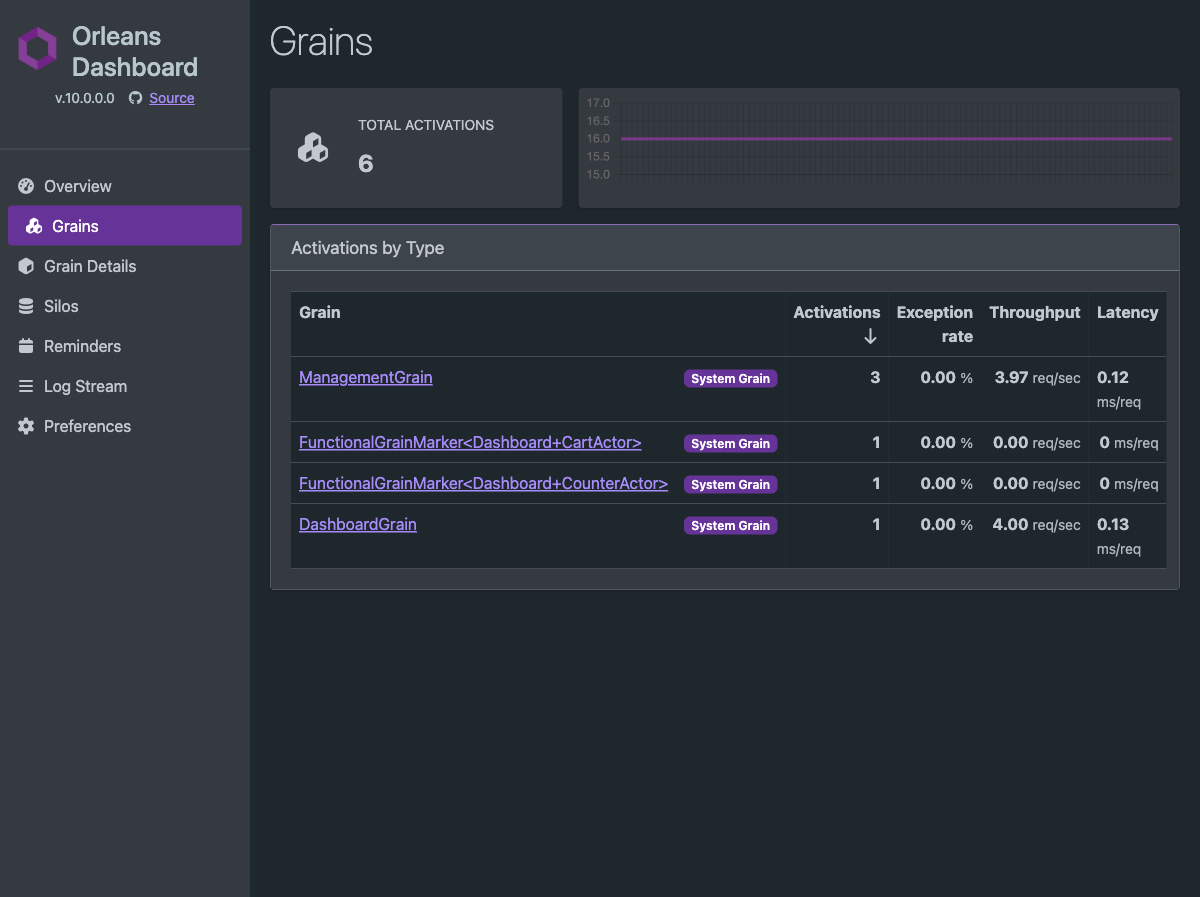
| Application actor brand | Dashboard activation type | Dashboard category |
|---|---|---|
CounterActor |
FunctionalGrainMarker<Dashboard+CounterActor> |
System Grain |
CartActor |
FunctionalGrainMarker<Dashboard+CartActor> |
System Grain |
The actor brand is therefore visible, but the logical contract strings dashboard.counter and dashboard.cart are not the row labels. Dashboard currently reports the manifest implementation marker. The System Grain category is also Dashboard’s current presentation of that marker; it does not change the actor’s application behavior.
Functional API-record fields share the runtime’s dispatch operation, so do not expect increment, value, add, and count to appear as four independently generated grain methods in the method profiler.
Run the example
Section titled “Run the example”dotnet run --project examples/dashboard/Dashboard.fsprojThen:
- Open
http://127.0.0.1:5080/exerciseto activate both actors. - Open
http://127.0.0.1:5080/dashboard/#/grains.
An automated registration, activation, and Dashboard HTTP smoke check is also available:
dotnet run --project examples/dashboard/Dashboard.fsproj -- --verify-siloSee the complete example source.
Protect it in production
Section titled “Protect it in production”Do not expose the Dashboard anonymously on a public endpoint. Apply ASP.NET Core authentication and authorization to the mapped endpoint, or put it behind an authenticated operations network.
endpoints .MapOrleansDashboard("/dashboard") .RequireAuthorization()|> ignoreFor package status and platform-specific details, see the official Orleans Dashboard documentation.